We’ve added a few important features over February and March. Here is the highlight.
SSL support
We just added an automated way to have your site served over SSL. This will let you have a site shown as secured in the browser, like this:
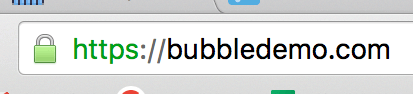
This is especially useful if you process payments in your app. Braintree, for instance, requires this to use the plugin. More generally, this inspires more trust for your users.
The certificate is available to users on a Professional Plan and higher. Once your domain is set up in the Settings Tab, section Domain, you’ll be able to pick an email of the domain and Activate your SSL. Then, you’ll get an email at this address, and once you’re done with the instructions there, the SSL connection will happen automatically after a few hours.
Database Connector — SQL
We recently created a way to access databases like MySQL and PostgreSQL directly from Bubble. The Database connector allows you to run arbitrary queries (with parameters!) and, for SELECT statements, to use the results in Bubble elements or actions. You’ll first create a connection string and then a query. The query can be used as a datasource, an action or both.
Data sources appear under the “Get data from an external API’ option in the value editor, while queries categorized as actions appear in the Plugins category in the new action dropdown.
A complete example with a sample, live MySQL server to test, are available here.
Other stuff
We’ve added a few other things. If you follow the forum you’ll see the whole list of announcements, but here is in a nutshell:
- Editor improvements: we’ve added long-awaited alignment features. We’ve also added the ability to edit mode than one element at once.
- Print as PDF: you can add the ‘SelectPDF’ plugin to your app to generate PDFs. The way it works is that you select a page that will be used to generate the PDF. You’ll find the action in the ‘Email’ section of the action menu.
- Custom Fonts: You can now add your own fonts to Bubble if the ones provided by Google don’t work for you. Go to Settings -> General to do this. The fonts will then appear at the top of the list.
Build for as long as you want on the Free plan. Only upgrade when you're ready to launch.
Join Bubble