
Hacking Bubble: The Download Hack

Learn how to let users download files from your Bubble app.

Ryan Roberts
October 24, 2016 • 2 minute read
Hacking Bubble: The Download Hack

Let’s say, you are making a cloud and/or sharing service. It would be disappointing to find out after putting in all of that work to make the app, you can’t have your users download an image from your website. At least it was for me, so if this very specific problem has occurred for you too, this article will explain how to make images download onto the user’s computer instead of doing this.

But can’t I just send the user to the file URL, wouldn't that download it for them, you ask?

Nope, probably. If this was any other kind of file, then most likely. We are talking about browsers here, so I can’t talk in absolutes. It’s difficult to assume a general behavior between all browsers as they can behave different from each other.

Okay, then what is probably the solution to this, you add?

This:
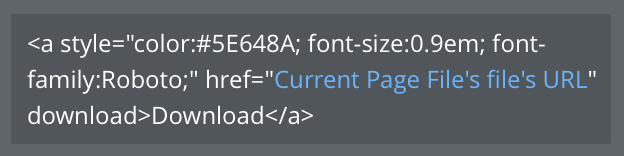
Let’s break this down. The <a> tag is for creating a link so we will need that to direct the page to the source image (or any file). The style=”” is a CSS element that you would use to style the button. href=”” is where you would enter the source file URL that the <a> tag will use. You can either copy and paste the static URL between the quotations if the file will not change, or add a dynamic element like I have. Finally, just type download after the href=”<link>”.

The addition of ‘download’ to the end of the href tag makes all of the difference, but then again, browsers, so I don’t know.

Just make an HTML element in Bubble and type this code in. You can change up the color hex, font-size, font-family, etc. Make it entirely how you want it to look. You can learn more about how to CSS in this Introduction to CSS.


Hacking Bubble is a series on how to make Bubble do things it probably wasn’t meant to do.

Don’t miss out on the latest Bubble content by signing up here.

Was this article useful? Do you have a better or different approach? Let me know!

Start building for free

Build for as long as you want on the Free plan. Only upgrade when you're ready to launch.

Join Bubble


LATEST STORIES

blog-thumbnail

Claude Sonnet 4.6 Goes Live in Bubble AI on Launch Day

We partnered with Anthropic to test Claude Sonnet 4.6 before public release, and now we're deploying it on launch day — giving you smoother app generation, better UI quality, and complete visual control.

Bubble
February 17, 2026 • 4 minute read
blog-thumbnail

Episode 3: Building Your App's Audience on YouTube First With Vai Singh

How Vai Singh validated his science content with 55K YouTube subscribers before building the Turing App

Bubble
February 17, 2026 • 4 minute read
blog-thumbnail

Emmanuel's February AMA: Mobile Plugin Builder, Branching Workflows, AI Development, and More

Bubble’s co-CEO covered AI development priorities, mobile plugin timelines, workflow branching, and platform infrastructure in his latest monthly AMA.

Emmanuel Straschnov
February 13, 2026 • 5 minute read
blog-thumbnail

The Beginner’s Guide to No-Code App Design and Builds

Vibe coding, agent assisted coding, visual development‌ — ‌what do these terms actually mean? This guide breaks down the terminology and shows you the fastest path from idea to working app.

Bubble
February 12, 2026 • 7 minute read

See How We Redesigned the Property Editor for Better Building

December 11, 2025 • 4 minute read

The Easiest Way to Build a Custom CRM (With AI, Updated for 2025)

October 10, 2025 • 17 minute read

What Can You Build on Bubble? 25 Examples to Inspire You

November 18, 2024 • 19 minute read

The Future of Bubble’s Editor: Introducing the New Workflow Tab

October 11, 2024 • 3 minute read

Efficient App Building 101: Improving Your Workload Usage

July 01, 2024 • 3 minute read

Build the next big thing with Bubble

Start building for free
CoAlias Logo Powered by CoAlias